
Firefox: S3.Translator
S3.Translator - это дополнение к браузеру, которое упростит вам посещение не русскоязычных сайтов.
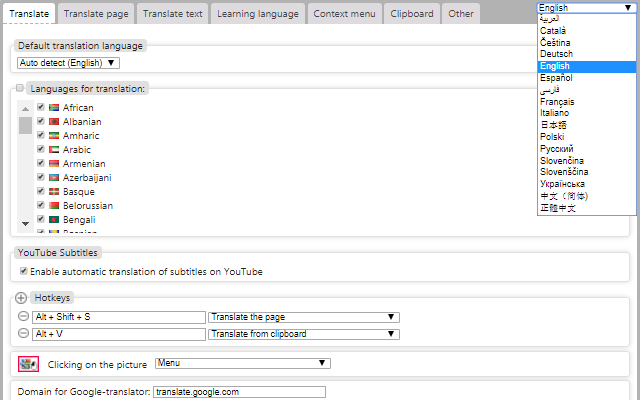
Дополнение основано на общедоступном интерфейсе от http://translate.google.com/ и поэтому в своем арсенале имеет более 100 языков, с которых вы можете сделать переводна русский на любой язык. Так же доступно и автоопределение языка оригинала.
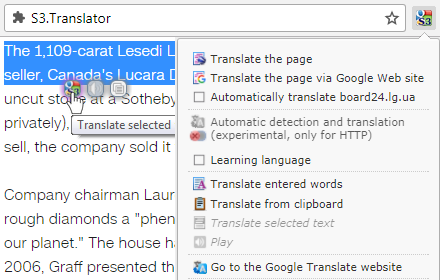
В кладовых дополнений Firefox есть много аналогов, простых и сложных: посмотреть доступный список дополнений , но у всех есть одна неприятная черта: при переводе выделенного текста теряется форматирование текста. S3.Переводчик лишен этой неприятности и, надеюсь, будет вам очень полезен.
Version for Firefox: This is a signed extension that will be automatically updated.
1. Download it: https://s3blog.org/download/s3gt/s3translator_firefox.xpi
2. Install s3translator_firefox.xpi
Версия для Google Chrome:
https://chrome.google.com/webstore/detail/s3translator/debnnjfbneojbmioajinefnflopdohjk
Версия для Microsoft Edge:
https://microsoftedge.microsoft.com/addons/detail/s3translator/accccapfemehmhdfabokhkimmnmdfphn
---


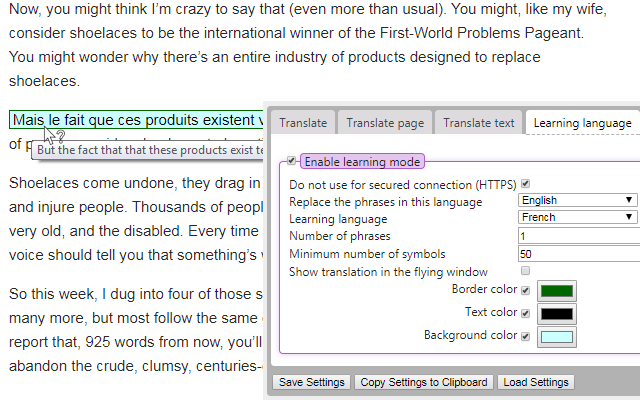

Новая функция: изучение выбранного языка!
Теперь вы можете не только переводить, но и выучить выбранный язык!
Теперь вы можете не только переводить, но и выучить выбранный язык!
По версии редакторов addons.mozilla.org дополнение S3.Переводчик признано лучшим дополнением месяца (Ноябрь, 2013)
https://blog.mozilla.org/addons/2013/11/01/november-featured-add-ons/
https://blog.mozilla.org/addons/2013/11/01/november-featured-add-ons/
Version for Firefox: This is a signed extension that will be automatically updated
1. Download it: https://s3blog.org/download/s3gt/s3translator_firefox.xpi
2. Install s3translator_firefox.xpi
1. Download it: https://s3blog.org/download/s3gt/s3translator_firefox.xpi
2. Install s3translator_firefox.xpi
Version for Google Chrome:
https://chrome.google.com/webstore/detail/s3translator/debnnjfbneojbmioajinefnflopdohjk
https://chrome.google.com/webstore/detail/s3translator/debnnjfbneojbmioajinefnflopdohjk
Version for Microsoft Edge:
https://microsoftedge.microsoft.com/addons/detail/s3translator/accccapfemehmhdfabokhkimmnmdfphn
https://microsoftedge.microsoft.com/addons/detail/s3translator/accccapfemehmhdfabokhkimmnmdfphn
Дополнение основано на общедоступном интерфейсе от http://translate.google.com/ и поэтому в своем арсенале имеет более 100 языков, с которых вы можете сделать перевод
В кладовых дополнений Firefox есть много аналогов, простых и сложных: посмотреть доступный список дополнений , но у всех есть одна неприятная черта: при переводе выделенного текста теряется форматирование текста. S3.Переводчик лишен этой неприятности и, надеюсь, будет вам очень полезен.
Version for Firefox: This is a signed extension that will be automatically updated.
1. Download it: https://s3blog.org/download/s3gt/s3translator_firefox.xpi
2. Install s3translator_firefox.xpi
Версия для Google Chrome:
https://chrome.google.com/webstore/detail/s3translator/debnnjfbneojbmioajinefnflopdohjk
Версия для Microsoft Edge:
https://microsoftedge.microsoft.com/addons/detail/s3translator/accccapfemehmhdfabokhkimmnmdfphn
How do I use the Learning Language mode?
1. 0pen settings
2. tab "Learning Language"
3. enable Learning mode (1)
4. For all sites -> uncheck "Do not use for secured connection (HTTPS)" (2)
5. Replace the phrases in this language: set all or your native language, such as English (3)
6. Learning language: set such as Italian (4)
7. visit the website in English
8. In the text will appear in a random location highlighted words translated into Italian. (5)
9. When you hover the mouse will appear source text (6)


1. 0pen settings
2. tab "Learning Language"
3. enable Learning mode (1)
4. For all sites -> uncheck "Do not use for secured connection (HTTPS)" (2)
5. Replace the phrases in this language: set all or your native language, such as English (3)
6. Learning language: set such as Italian (4)
7. visit the website in English
8. In the text will appear in a random location highlighted words translated into Italian. (5)
9. When you hover the mouse will appear source text (6)
---
Похожие материалы:
15 Августа 2026 (18:04:04)
build a hooper game
(гость)
• ответить
It's great that S3.Translator allows users to not only translate but also actively learn the target language while browsing. That's a valuable addition!
build a hooper game
build a hooper game
17 Августа 2026 (10:21:54)
Spencer Begum
(гость)
• ответить
I’ve used browser translation tools before, and I agree with the problem you mentioned—usually formatting gets messed up when you highlight and translate. That’s really frustrating, especially for longer texts. Your extension seems like a practical solution, and I appreciate the effort behind it. By the way, that reminds me of how Geometry Dash keeps things simple and smooth: if you haven’t tried the platform yet, you can jump in and test levels with fewer “interruptions” to your experience. Also, thanks to the admins—sometimes support deserves a message back.
17 Августа 2026 (14:41:47)
Build a Bucket NBA Game
(гость)
• ответить
I like that S3.Translator preserves formatting when translating selected text, unlike some other extensions.
@Build a Bucket NBA Game
@Build a Bucket NBA Game
20 Августа 2026 (06:21:07)
Jduer
(гость)
• ответить
Wow, S3.Translator sounds incredibly useful, especially with the new language learning feature! I've always struggled with maintaining formatting when translating text, so hearing that S3.Translator avoids that issue is a huge plus. It reminds me of how much I appreciate well-designed interfaces, much like the satisfaction of perfectly serving customers in Papa's Freezeria! I'll definitely be checking this out for Firefox
27 Августа 2026 (16:18:40)
Michael Smith
(гость)
• ответить
I noticed the Firefox-related links, especially the S3.Translator entry alongside the download manager and Menu Wizard posts. The page feels organized for someone following browser tools and fixes, and the comments list suggests there’s active discussion around those topics. esimx turkey
3 Сентября 2026 (06:46:54)
hoaiheo
• ответить
Redactle is a deceptively simple browser game built around one clever idea: a Wikipedia article is presented with nearly all words redacted, and your task is to reveal words and deduce the article’s title with as few guesses as possible. It blends trivia, pattern recognition, and vocabulary strategy into a daily puzzle that rewards curiosity and careful inference.
4 Сентября 2026 (20:58:18)
Temp
(гость)
• ответить
Нашёл на S3.Blog информацию о дополнении S3.Translator для Firefox — оно упрощает перевод. I Love youI Love You, если хочешь сказать это на разных языках.
8 Сентября 2026 (11:44:50)
Annabelle Nilsen
(гость)
• ответить
I once installed a supposed productivity tool that quietly redirected my search queries. It felt like a game of Buckshot Roulette trying to pinpoint the culprit amongst my many extensions.
8 Сентября 2026 (21:27:42)
Harry Gilreath
(гость)
• ответить
You are having the details that we want to know so we can resolve the issues we are facing. So when people visit our site they will see amazing solutions from the professional workers who deal with the issues carefully.
@https://buildahooper.org